Loggerhead

Native Swift · Built for agentic development

Your coding agent reads your app's logs, metrics, and traces.

Loggerhead receives the logs, metrics, and traces from the software you run on this Mac, and shows them in one window. It is one Mac app, not a Docker stack, and nothing leaves your machine. It works with no internet connection. Telemetry linting then names the noise you would pay for in production.

  • macOS 15 or later
  • Apple silicon and Intel
  • Notarised, free to start
  • Native Swift, no runtime to install
  • Works offline
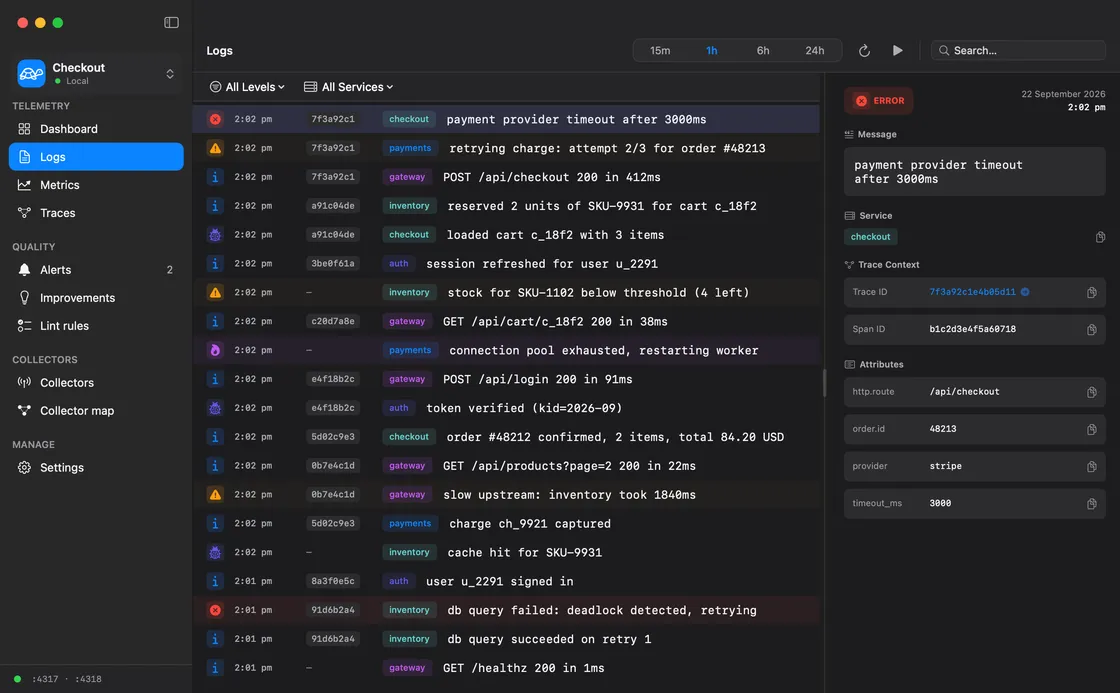
The Loggerhead Logs page. The sidebar lists Dashboard, Logs, Metrics, and Traces under Telemetry, then Alerts, Improvements, and Lint rules under Quality. The log list shows lines from five services with severity icons, trace IDs, and service badges, and the detail pane shows the selected error with its trace context and attributes.

Three signals, one window

Logs, metrics, and traces that already know each other.

Click a log line and jump to its trace. Click a span and see the logs it emitted. One local store keeps every signal in the same time base, so you stop stitching tabs together.

Dashboard
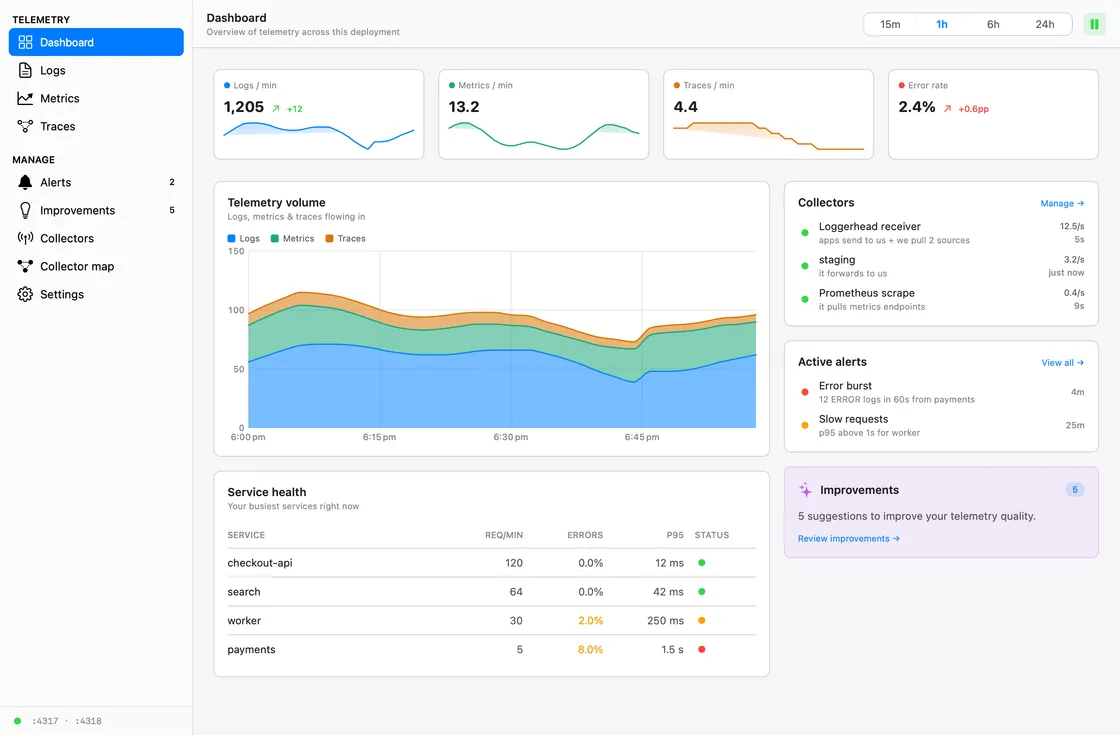
The Dashboard page in Loggerhead. Four tiles show logs a minute, metrics a minute, traces a minute, and the error rate. A stacked area chart shows the telemetry volume of the last hour. Panels list the collectors, two active alerts, and five improvements. A table ranks four services by requests, errors, and p95 latency.
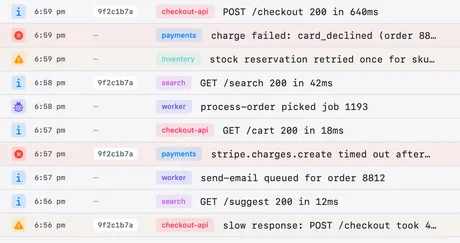
  • The log list in Loggerhead. Each row shows a severity icon, the time, a trace id, the service, and the message.

    Logs that stream, not scroll

    Severity tints, service colours, and filters for level and service. Search the message text, pause the stream, and open one line to read its fields.

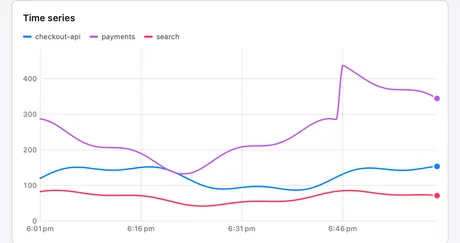
  • A metric chart in Loggerhead. Three services draw one line each for http.server.request.duration, with the label filter above the chart.

    Metrics with a memory

    Counters, gauges, and histograms land in DuckDB. Pick any window, group the series by label key, and compare services without an exporter in the middle.

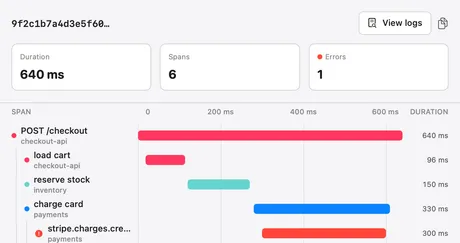
  • A trace waterfall in Loggerhead. Six spans of a POST /checkout request, with the failed stripe.charges.create span marked in red.

    Traces you can actually read

    A waterfall per request, spans grouped by service, and the slow one highlighted. Jump from a span to the logs it produced in one click.

Built for agentic development

Give your coding agent eyes on the running app.

AI coding tools guess when they cannot see. Loggerhead gives them a window into your running app through MCP, an open standard those tools already speak. The tool reads what your app actually did, then fixes the real problem.

WORKS WITH

  • Claude Code
  • Cursor
  • Codex
  • Windsurf
  • Any MCP client

One root, many branches

Push telemetry in, or let Loggerhead pull it.

The app runs the receiver on localhost. Docker, Kubernetes, another Mac, or your app's SDK pushes into it as a branch. Loggerhead can also scrape a URL on a schedule, so tools that only expose metrics still show up. Every source gets an ID, so you always know where a record came from.

Collector map
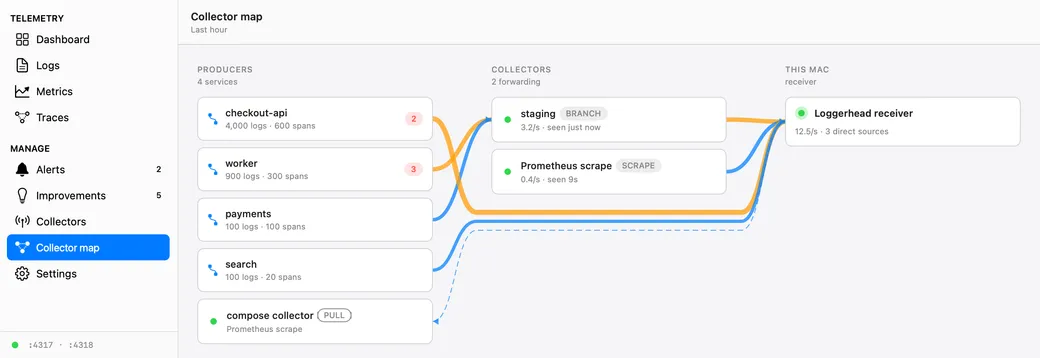
The Collector map page in Loggerhead. The receiver on ports 4317 and 4318 sits between three collectors, local, staging, and a Prometheus scrape, and the DuckDB file on disk. Each collector lists the services it carries and its record rate.

The app draws the same picture from live traffic. Every collector shows the services it carries, its record rate, and the moment it last spoke.

Telemetry linting

Lint your telemetry before production sends you the bill.

Most apps log too much and measure the wrong things. Loggerhead checks what your app emits in two ways. Lint rules are fixed checks that you set. AI analysis reads a longer window and finds the patterns a rule misses. Every finding comes with the fix already written. Copy it into the AI tool in your project, and the agent changes the code.

Lint rules

Fixed checks, like a code linter

Forty-one rules read the last hour of logs, metrics, and spans every 30 seconds. They are deterministic: the same data gives the same findings each time. On the Rules tab of the Linting page, you turn each rule on or off and set its thresholds.

  • Debug lines that repeat thousands of times
  • Emails, tokens, and card numbers in log fields
  • Labels with thousands of values
  • Errors with no trace context
Tune the rules

AI analysis

Pro

A model reads the whole window

AI analysis sends one large prompt to a model and finds the problems that a fixed rule cannot see. You choose the window: the last hour, or the last 24 hours. It uses Apple Intelligence on your Mac first, with no key, and nothing leaves the Mac. For a stronger model, add your own AI provider key.

  • The same log line from two places in the code
  • Traces that must line up, and do not
  • One root cause behind findings in many services
  • Which problem to fix first
How AI analysis works
Improvements
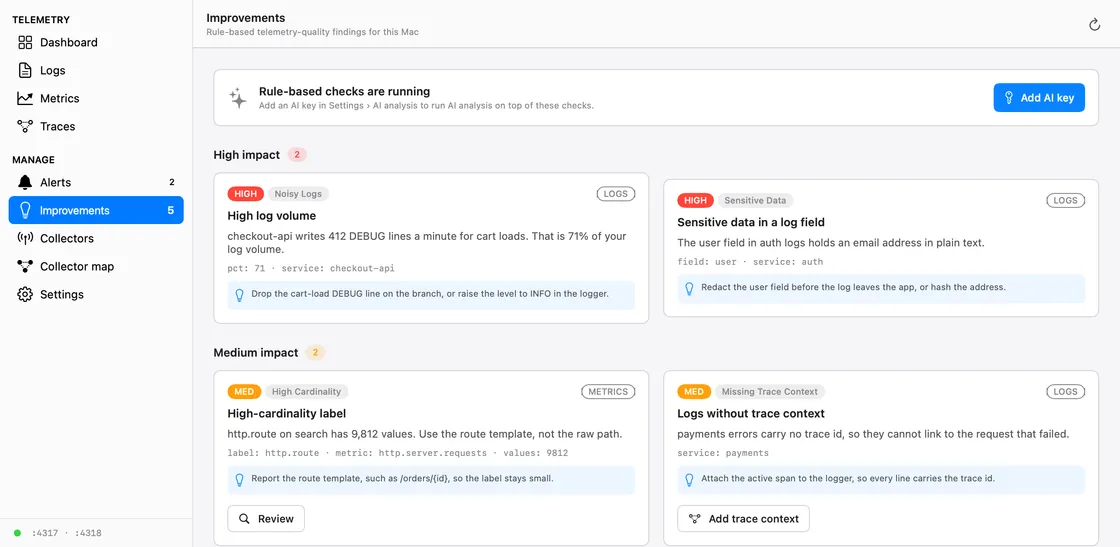
The Linting page in Loggerhead. Five findings: a high log volume on checkout-api, an email address in an auth log field, a high-cardinality http.route label, payments logs without trace context, and a stale queue.depth metric. Each finding carries a written fix.
  1. 1.Loggerhead finds itA lint rule or AI analysis names the problem, the service, and the field.
  2. 2.You copy the fixEvery finding carries the fix in plain words. One copy, and no query language to learn.
  3. 3.Your agent applies itPaste it into Claude Code, Cursor, Codex, or Windsurf. The agent edits the logger or the collector config in your project.
  • Cut the noiseDrop and sample the lines nobody reads. Keep the ones that explain a failure.
  • Catch secrets earlyEmails, tokens, and card numbers get flagged before they reach anyone's logs.
  • Keep traces wholeEvery error links to the request that caused it. No more orphan logs.
  • Fix it where the code isThe fix goes to the tool that already has your project open, so the change lands in your repository.

Made for the person who runs the app

A development environment for how your code behaves.

Loggerhead is not a production observability platform, and does not want to be. It is the window you keep open next to your editor while you build, test, and stage.

  • Solo developers

    One native app, one window, zero infra. See what your side project actually does before you ship it.

    • Runs with your app, not next to a cluster
    • Nothing to host, nothing to pay per GB
    • Query a week of local traffic in milliseconds
  • Staging and preview

    Point a staging cluster at your Mac over a tunnel and get a full picture of a release before it goes live. Staging and local stay apart: each environment keeps its own database.

    • One workspace per project, one environment per deployment
    • Branch collectors for Docker and Kubernetes
    • Alerts and improvement hints on real traffic
  • Agent-first workflows

    Give Claude Code or Cursor the same view you have. The agent reads logs and traces over MCP, then acts on facts.

    • MCP server included, one click to add
    • Search, aggregate, and trace lookups as tools
    • Local only, so the agent never sees prod

Honest scope: DuckDB on one Mac. Great for local and staging traffic. Keep your production platform for production.

Up in three steps

From download to your first insight in under two minutes.

  1. Install the app

    Download, open, and drag Loggerhead to Applications. The receiver, the store, and the MCP server all run inside the app. There is nothing else to install.

  2. Choose what to watch

    Inside Loggerhead, pick a source: an app on this Mac, Docker, Kubernetes, or a URL to scrape. Loggerhead picks a free port for you.

  3. Connect your AI coding tool

    Pick the tool you use and click once. It can then read what your app did and fix real problems.

    Add Loggerhead to Claude Code

    Works with any tool that supports MCP.

Buy once, keep it

One licence. No seats, no ingest bill, no subscription.

  • Free

    $0forever

    Everything a solo developer needs to see one app on one Mac.

    • Logs, metrics, and traces
    • One workspace with one environment
    • The Loggerhead receiver and one branch collector
    • One pull source and one scrape endpoint
    • MCP server for your coding agent
    • Telemetry linting: 42 rules, with the fix for your AI tool
    • Support by email
    Download free
  • Pro

    $39one-time

    For staging traffic, many collectors, and the alerting that catches a bad release.

    • Everything in Free
    • Unlimited workspaces and environments
    • Unlimited branch collectors
    • Unlimited pull sources
    • Standalone receivers and unlimited scrape endpoints
    • Keep data as long as you like
    • AI analysis, on your Mac or with your own key
    • Alerts, native notifications, and menu bar status
    • One year of updates, then keep the version you have
    • Renew the updates for $19 a year, only when you want them
    Buy Loggerhead
  • Lifetime

    $89one-time

    Everything in Pro, and every future release. Pay once and never renew.

    • Everything in Pro
    • Every future release of Loggerhead
    • No renewal, ever
    • A Pro licence upgrades to Lifetime for $50
    Buy Lifetime

Questions

What people ask before they download.

If your question is not here, email[email protected]and a person answers.

  • Does my telemetry leave my Mac?

    No. Loggerhead receives logs, metrics, and traces on 127.0.0.1 and writes them to a DuckDB file in your Application Support folder. There is no cloud account, no upload, and no third-party ingest. The one exception is your choice: if you pick a cloud model for AI analysis, the app sends a sample of your telemetry to that provider with your own key, after it masks values such as email addresses and IP addresses. With Apple Intelligence, the analysis stays on the Mac. The privacy page lists everything that reaches a server.

  • Does Loggerhead work offline?

    Yes. Loggerhead needs no internet connection. The receiver, the database, the lint rules, and the MCP server all run on your Mac. AI analysis with Apple Intelligence also runs on the Mac. Four things use the network: the check for app updates, on Pro a daily check that the licence is still active, AI analysis with a cloud provider key, and a problem report when you send one. The licence check sends the licence ID and nothing else. With no network, Pro stays on.

  • What does Loggerhead cost?

    Loggerhead Free costs nothing and stays free. It covers one app on one Mac: logs, metrics, traces, the receiver, one branch collector, one pull source, the MCP server, and the 42 lint rules with the fix for each finding. Loggerhead Pro costs US$39 once, not per month and not per seat, and includes one year of updates. Loggerhead Lifetime costs US$89 once and includes every future release. Both add unlimited collectors and sources, unlimited data retention, AI analysis, and alerts. There is no ingest charge at any price.

  • What happens when the year of Pro updates ends?

    You keep the version you have, and it keeps working. A Loggerhead Pro licence buys one year of updates. After that year you can renew for US$19 to get one more year of new versions, or you can stay on the last version the licence covered. A Lifetime licence gets every update and never needs a renewal, and a Pro licence upgrades to Lifetime for US$50. Loggerhead never stops working because a licence lapsed.

  • Which Macs does Loggerhead run on?

    Loggerhead needs macOS 15 or later, and it runs on both Apple silicon and Intel Macs. It is one notarised Swift application with no runtime to install. There is no Linux build, no Windows build, and no hosted version.

  • Do I have to change my application to use Loggerhead?

    You point your application’s OpenTelemetry exporter at http://127.0.0.1:4318 and give it a service name. If the application already emits OpenTelemetry data, that is a change to two environment variables. If it does not, you add the OpenTelemetry SDK for your language first. Loggerhead can also scrape a Prometheus metrics endpoint, which needs no change to the application at all.

  • Can my AI coding tool read the data?

    Yes. Loggerhead hosts a Model Context Protocol server inside the app, on loopback. Claude Code, Cursor, Codex, Windsurf, and any other MCP client read logs, metrics, traces, and telemetry-quality findings through it. Nine tools only read. Seven tools change the lint rules or ignore a finding. Each of them needs a reason, and you can undo the change on the Rules tab of the Linting page. One tool marks a finding fixed after a code change. No tool deletes telemetry, and no tool reaches another machine.

  • Does Loggerhead work with Docker and Kubernetes?

    Yes. Loggerhead runs one OpenTelemetry receiver on your Mac, the root. A standard OpenTelemetry Collector in Docker or in a Kubernetes cluster runs as a branch and forwards into that root. A container reaches the root at host.docker.internal. A cluster reaches it through a tunnel. Every record carries the ID of the collector that sent it.

  • Is Loggerhead a replacement for Datadog or Grafana?

    No. Loggerhead is a development tool, not a production observability platform. It is the window you keep open next to your editor while you build, test, and stage a release. It holds local and staging traffic on one machine. It does not do on-call rotations, long retention across a fleet, or multi-user dashboards.

  • Do I need an account to use Loggerhead?

    No. Loggerhead has no account and no sign-in. You download the disk image, drag the app to Applications, and open it. A Pro purchase sends a licence key to your email address, and you paste that key into the app.

  • Can I keep two projects apart?

    Yes. Loggerhead keeps one workspace per project, and each workspace owns its own receiver port pair: 4317/4318 for the first, 4319/4320 for the second. Inside a workspace, each environment such as Local, Staging, or Production owns its own database, and a record picks its environment with the deployment.environment tag. The app shows one environment at a time, and you switch with one click in the sidebar. Free has one workspace with one environment; Pro has unlimited workspaces and environments.

  • What is telemetry linting?

    Telemetry linting reads what your application emits and reports the problems before production charges you for them. It finds debug lines that repeat thousands of times an hour, labels with unbounded cardinality, an email address or a card number in a log field, an error that lost its trace context, and a metric that stopped arriving. Each finding carries a written fix that you paste into the AI coding tool that already has your project open. Free runs every lint rule and shows every fix.

  • What is the difference between the lint rules and AI analysis?

    The lint rules are deterministic checks, like a code linter: 42 rules read the last hour of telemetry, the same data gives the same findings, and you turn each rule on or off and set its thresholds on the Rules tab of the Linting page. AI analysis is a separate Pro check. It sends one large prompt to a model over a window you choose, such as the last hour or the last 24 hours, and finds patterns a rule cannot see, such as the same log line from two places or traces that do not line up. It uses Apple Intelligence on the Mac first, with no key, or a provider key that you add.